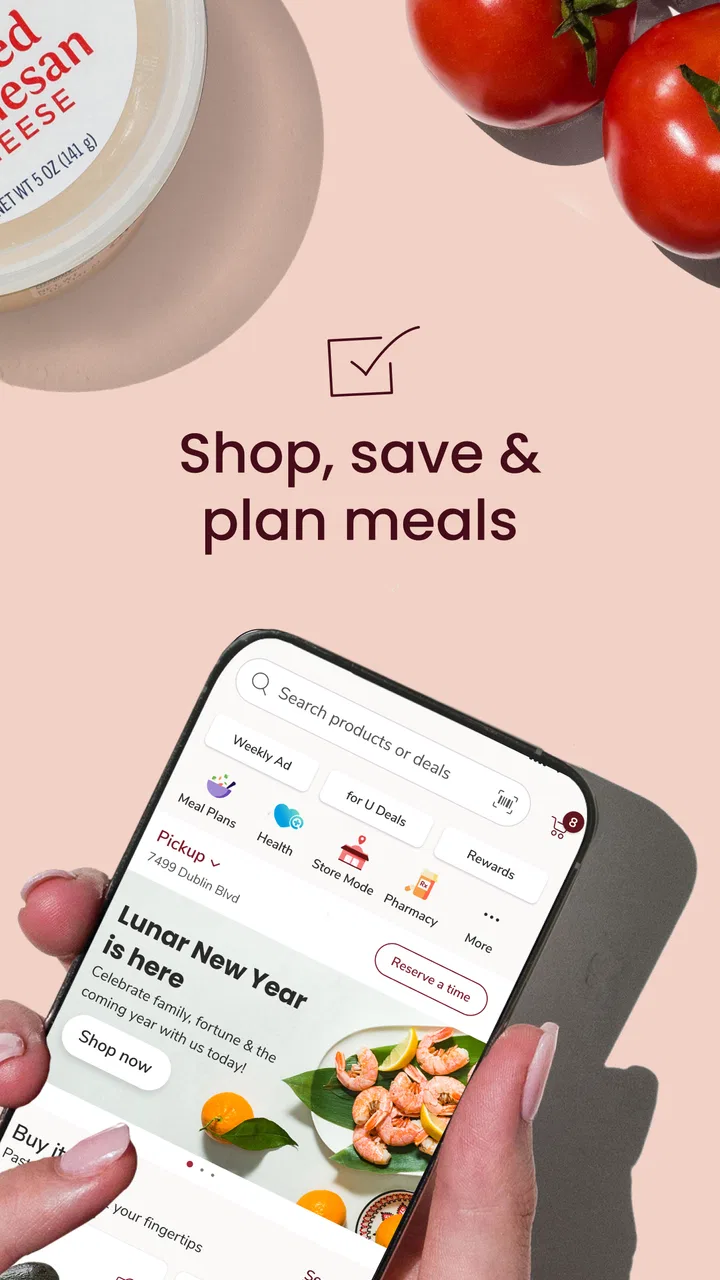
Safeway Deals & Delivery
- 4.7
- Rating
- 10.00M
- Installs
- Free
- Price

 Analysis by App-foxy
I use grocery apps for one simple reason: I want to spend less time planning a shop and less time standing in a checkout line. Safeway Deals & Delivery is built around that routine, bringing Safeway shopping, deals, delivery, and pickup into one place. After using it as a shopping app rather than treating it like a digital brochure, I found it most useful when I already knew where I wanted to shop and needed a quicker way to organize the order.
The app is free, belongs to the Shopping category, and is developed by Albertsons Companies, Inc. Its broad audience is reflected in an Everyone age rating, while its strong 4.7 average from around 413 thousand ratings and more than 10 million installs suggest that it has become a familiar tool for many grocery shoppers. That popularity does not make every part of the experience perfect, but it does indicate that the basic combination of offers and order fulfillment works for a large number of people.
How the app fits into a real grocery routine
My preferred way to use it is before leaving home. I open the app, look through available Safeway deals, add the items I actually need, and decide whether pickup or delivery makes more sense. That sequence matters because browsing discounts without a shopping plan can encourage unnecessary purchases. The app is at its best when it helps me turn a grocery list into a practical order, not when I use it simply to scroll through promotions.
You May Also Like

 Blood Strike: 2.5 Anniversary
Blood Strike’s Loadouts Turn Every Drop Into a Tactical Gamble
A close look at Blood Strike’s custom loadouts: how fast access to signature weapons reshapes its battle royale rhythm, rewards preparation, and narrows the gap between fights.

 Pandora - Music & Podcasts
Pandora’s Music Is Easy to Start, but Harder to Recover
Pandora’s strength is its low-effort path from a seed to a station. Its weak spot is how much confidence it asks you to place in connection, setup, and quiet recovery.

 8 Ball Pool
 Is Built on Rivalries, Rematches, and Routine
A close look at the rivalries, rematches, shared routines, and unanswered safety questions that turn a quick pool match into a persistent mobile community.

 Samsung Music
’s Quiet Strength Is Playing What You Already Own
Its reach comes less from spectacle than from dependable access to a personal library. That simplicity is both the app’s strongest retention engine and its ceiling.

 AccuWeather: Weather Radar
AccuWeather Review: A Quick, Clear Forecast for Everyday Decisions
For everyday plans, the best forecast is the one you can understand quickly. AccuWeather makes rain timing, radar, and local conditions easy to act on, with a few trade-offs.

 Hill Climb Racing
Why Hill Climb Racing Still Turns Crashes Into One More Run
A tiny car, a bumpy hill and one more upgrade: Hill Climb Racing keeps resurfacing because its simple chaos makes every near-miss feel personal.
More From Our News Desk
View All News


A realistic example is a busy weekday evening. I might notice that the refrigerator is nearly empty, build a basket during a lunch break, and choose pickup so I do not have to walk through the store after work. On another day, delivery may be more convenient, especially when carrying groceries would be difficult. Having both options in the same shopping flow is more useful than relying on a separate coupon app, a store website, and a different service for fulfillment.
The biggest advantage is the connection between Safeway deals and the shopping process. A discount is more valuable when I can apply it while building the basket and see the result before completing the order. It also makes planning easier for households that buy many of the same products repeatedly. I can check the current offer, decide whether the saving is worth changing brands, and keep the order focused instead of making a separate trip just to compare shelf tags.
That convenience comes with a trade-off. Digital shopping encourages me to think in terms of listed products and promotions, while an in-store visit gives me more freedom to inspect produce, compare package sizes, or notice an unplanned need. For routine pantry items, the app is efficient. For shoppers who choose most food by appearance or want to browse the aisles, pickup and delivery cannot fully replace the physical store.
What feels strongest in the current version
The current release is version 2026.4.1, and the app has been available since May 10, 2012. That long history is relevant because grocery ordering has to serve both occasional users and people who depend on it every week. I found the overall concept easy to understand: shop through Safeway, review deals, and select a fulfillment method. It does not require me to learn an unfamiliar shopping model before I can place a normal order.
The app’s current state also benefits from having a clear purpose. It is not trying to be a general marketplace or a social shopping network. Its value comes from connecting a particular grocery chain with digital ordering. That focus makes it more practical for existing Safeway customers than a broad delivery marketplace when the local store inventory and available services meet their needs.
I would still approach the experience as a planning tool rather than a guarantee that every item I see will be available when the order is prepared. Grocery inventory changes quickly, and a digital basket cannot remove the uncertainty created by demand, substitutions, or store-level availability. I recommend reviewing the completed order carefully and keeping a small backup plan for essential ingredients, particularly before cooking for guests or preparing a large family meal.
Another useful habit is separating “must buy” items from “good deal” items in my head. The app makes promotions easy to notice, but a lower price is not automatically a saving if it causes me to buy something I would not otherwise use. I get better results when I start with a list, then use the deal section to adjust brands, quantities, or timing. This is a small workflow change, but it prevents the promotional side of the app from taking over the practical side.
What the long product history means for shoppers
Since its release in 2012, the app has had time to move beyond a simple store locator or digital circular. Its present identity is centered on a complete grocery journey: finding products, noticing offers, and choosing delivery or pickup. I see that as the most important product evolution because each part supports the others. A list without fulfillment is less convenient, and delivery without useful deal discovery can feel expensive or disconnected from normal store shopping.
The current version number shows that the product is actively maintained, but a version label alone is not proof that every change will be visible to every shopper. In practice, the effect of an update depends on the phone, the selected store, and which services are available in the shopper’s area. I would judge the app by whether it makes my own weekly order easier, not by expecting every installation to behave identically.
For a new user, the most important change over the years is the shift from shopping only inside the store to managing the shop remotely. For an existing user, the benefit is less dramatic: the app becomes a repeat-order companion. I can use it to prepare before visiting, switch to pickup when time is tight, or arrange delivery when convenience matters more than browsing. That flexibility is more valuable than any single promotional screen.
One non-obvious strength is that the app can help me make a better decision about the shopping method itself. I do not have to commit to delivery every time I open it. If the basket is small and I am already near the store, pickup may be the sensible choice. If the order is bulky or my schedule is unpredictable, delivery may justify the added convenience. The app is therefore useful even when I ultimately decide to collect the order rather than have it brought to me.
How existing users may experience the updates
People who already shop at Safeway are likely to feel the greatest benefit because the app fits an established habit. They already know the products, the store layout, and the kinds of promotions they watch for. The digital layer mainly removes steps: checking offers from home, preparing a basket in advance, and choosing how to receive it.
For repeat shoppers, I suggest treating each order as a short planning session rather than rushing straight to checkout. I first review household staples, then inspect deal-related changes, and finally check whether pickup or delivery suits that day. This order of operations keeps the basket grounded in actual needs. It also makes it easier to spot when a promotion is influencing the purchase more than the household budget should allow.
Existing users should also expect some friction when their preferred item is unavailable or when the selected store does not support the same fulfillment choice they had in mind. That is not a reason to abandon the app, but it is a reason to avoid waiting until the last minute for important groceries. I would use it confidently for ordinary weekly shopping while allowing extra time for a special meal, holiday preparation, or an order containing hard-to-replace products.
The app can be especially helpful for people who find store visits tiring, parents managing a narrow shopping window, and households that need to coordinate purchases around work. It is less compelling for someone who shops impulsively, enjoys comparing every product in person, or lives outside the practical reach of Safeway services. In those cases, a physical visit or a broader grocery marketplace may be a better fit.
One trade-off that existing users should consider is control versus convenience. In-store shopping gives me immediate control over substitutions, freshness, and the exact item I put in the cart. Ordering through the app gives me time savings and a more deliberate basket, but it places more responsibility on me to review product details and think ahead. Neither approach wins in every situation.
Where the experience still has limits
The app cannot make grocery shopping entirely frictionless. I still need to verify that the selected products match what I intended to buy, especially when similarly named items or different sizes appear together. A quick review before placing the order is worthwhile. It is much easier to correct a mistaken choice while I am still looking at the basket than after the order has been prepared.
Delivery and pickup also solve different problems, so I would not choose between them automatically. Pickup can preserve more control over timing and may suit a shopper who is already passing the store. Delivery is more convenient when travel is difficult, but it depends on being available to receive the order and on the service fitting the local shopping situation. The right option is the one that reduces the most inconvenient part of that particular trip.
Another limitation is that the app is closely tied to Safeway. That specialization is its advantage for loyal customers, but it is also the reason I would not recommend it as a universal grocery comparison tool. If my priority is comparing several supermarket chains at once, I would look elsewhere. If my priority is shopping through Safeway and using its own deals, the focused approach makes more sense.
Price-conscious shoppers should be careful not to confuse a digital deal with the lowest possible total for the entire basket. The app can make Safeway promotions easier to use, but the final decision still requires comparing sizes, brands, and what is already in the kitchen. I found the best value by using deals to support a planned shop, not by rebuilding the entire shop around whichever promotion appeared first.
There is also a human limitation that no interface can solve: grocery preferences vary widely. Someone who wants to select every piece of fruit personally may be disappointed by any delivery workflow. Someone who needs an order completed quickly may find browsing and reviewing choices slower than expected. The app is strongest for predictable purchases and weakest when the shopper needs extensive physical inspection.
Who should use it and who should skip it
I would recommend Safeway Deals & Delivery to regular Safeway customers who want one place for online grocery shopping, deals, pickup, and delivery. It is particularly practical for weekly household orders, repeat pantry purchases, and shoppers who can save time by preparing the basket before arriving at the store.
I would also suggest it to anyone testing whether digital grocery shopping can fit their routine without immediately committing to a third-party marketplace. Because the app is free, trying the shopping workflow does not require a purchase upfront. The useful test is simple: build a normal basket, examine the available fulfillment choice, and decide whether the process is easier than the way you currently shop.
I would skip it if Safeway is not one of the stores I normally use, if I need a single app to compare many retailers, or if I strongly prefer choosing fresh food personally. I would also avoid depending on it as my only plan for urgent or highly specific ingredients. A quick in-store visit can be better when the exact product matters more than convenience.
Families can get more from it by agreeing on a shared list before opening the app. Otherwise, the person placing the order may focus on deals while overlooking household preferences. For people shopping alone, the app is easier to manage because the basket, promotions, and fulfillment decision stay in one workflow. In both cases, the best results come from using it deliberately rather than treating it as an endless catalog.
What I would watch in future use
When I continue using the app, I pay attention to three practical things: how clearly it handles changes to the basket, how much effort is needed to review the final order, and whether pickup or delivery genuinely saves time on that day. These are more meaningful to me than a new visual layout. A grocery app earns its place on my phone by reducing mistakes and errands.
I also watch how well the experience adapts to different shopping patterns. A strong weekly workflow should work for a small top-up order as well as a larger household shop. Deal discovery should remain helpful without becoming distracting, and the fulfillment choice should be clear enough that I know what I am agreeing to before completing the order. Those details determine whether I return every week or only use the app occasionally.
The app’s continued development is worth following because grocery shopping habits keep changing, but I would separate confirmed present value from future expectations. What I can judge now is the established combination of Safeway shopping, promotions, delivery, and pickup in a free app with broad adoption. I would not choose it because of imagined features; I would choose it if that existing combination matches my local routine.
My recommendation after using it
Safeway Deals & Delivery is a focused grocery companion rather than a complete replacement for the supermarket. I like it most when I have a clear list, want to check Safeway offers, and need the choice between collecting an order and having it delivered. The app saves the most effort before the shopping trip, where planning can prevent a rushed visit and make the final basket easier to review.
Its limitations are real: product availability can affect the order, fresh-food selection is less personal than shopping in person, and shoppers looking across multiple chains may need another solution. Still, those drawbacks are easier to accept when I use the app for the situations it handles well instead of expecting it to solve every grocery problem.
With a 4.7 average and more than 50 thousand written reviews, it has clearly earned substantial user attention, and its 10-million-plus install level shows that it is not a niche experiment. The price is free, the age rating is Everyone, and the current version is 2026.4.1. My honest recommendation is to try it if Safeway is already part of your shopping routine. Start with one ordinary order, review the basket carefully, and compare pickup with delivery based on the day’s needs. If that process saves you time without making you give up too much control, this app is a sensible addition to your grocery routine.
FAQs for Safeway Deals & Delivery
01What features does the Safeway Deals & Delivery app offer?
The Safeway Deals & Delivery app provides a comprehensive platform for grocery shopping. Users can access digital coupons, weekly ads, and personalized deals. The app also offers a delivery and pickup service, allowing you to order groceries directly to your home or schedule a convenient pickup time at your local Safeway store. Additionally, it features a shopping list tool and pharmacy services for added convenience.
02How does the delivery service work in the Safeway app?
The delivery service in the Safeway app is user-friendly. After selecting your items, you can choose a delivery time that suits your schedule. A personal shopper will pick and pack your order, ensuring you receive fresh and quality products. You’ll receive updates on your order status, and delivery is available to various locations, with fees depending on your order total and delivery time.
03Are there any fees associated with using the Safeway app?
While the Safeway app itself is free to download and use, there may be fees associated with certain services. Delivery fees vary based on order size and delivery time. Additionally, a subscription to Safeway’s FreshPass might be available, offering unlimited free delivery and other perks for a monthly or annual fee. Always check the app for the latest pricing and subscription options.
04Is the Safeway Deals & Delivery app available on both Android and iOS?
Yes, the Safeway Deals & Delivery app is available for both Android and iOS devices. You can download it from the Google Play Store for Android devices or the Apple App Store for iOS devices. The app is designed to be user-friendly on both platforms, ensuring a seamless experience regardless of your device.
05How can I ensure the security of my personal information on the Safeway app?
Safeway takes user privacy and security seriously. The app uses encryption to protect your personal and payment information during transactions. It’s also advisable to use strong, unique passwords and enable biometric authentication if available on your device. Regularly updating the app will ensure you have the latest security features and patches. For more details, you can review Safeway's privacy policy within the app.
Pros
- User-friendly interface for easy navigation.
- Features personalized shopping lists.
- Offers exclusive discounts and promotions.
- Includes a rewards program for frequent users.
- Allows for contactless grocery delivery.
Cons
- Limited delivery areas can restrict usage.
- Occasional app crashes disrupt shopping.
- Some deals require membership sign-up.
- In-app ads may interrupt browsing.
- Lacks offline shopping list capabilities.

Safeway Deals & Delivery
Gallery